
API Flows
Ayoconnect's Instant Transfer (v2) solution consists of two main flows and two supporting flows.
The main flows are used to validate beneficiary accounts and initiate disbursements. The supporting flows allow merchants to check transaction statuses and available balances.
Available Flows
| Type | Flow | Description | Execution Mode |
|---|---|---|---|
| Main | Account Validation | Validates the beneficiary's bank account before initiating a disbursement. | Asynchronous |
| Main | Disbursement | Initiates a fund transfer to a validated beneficiary account. | Asynchronous |
| Supporting | Status Inquiry | Retrieves the latest disbursement status when a callback is delayed or verification is required. | Synchronous |
End-to-End Disbursement Flow
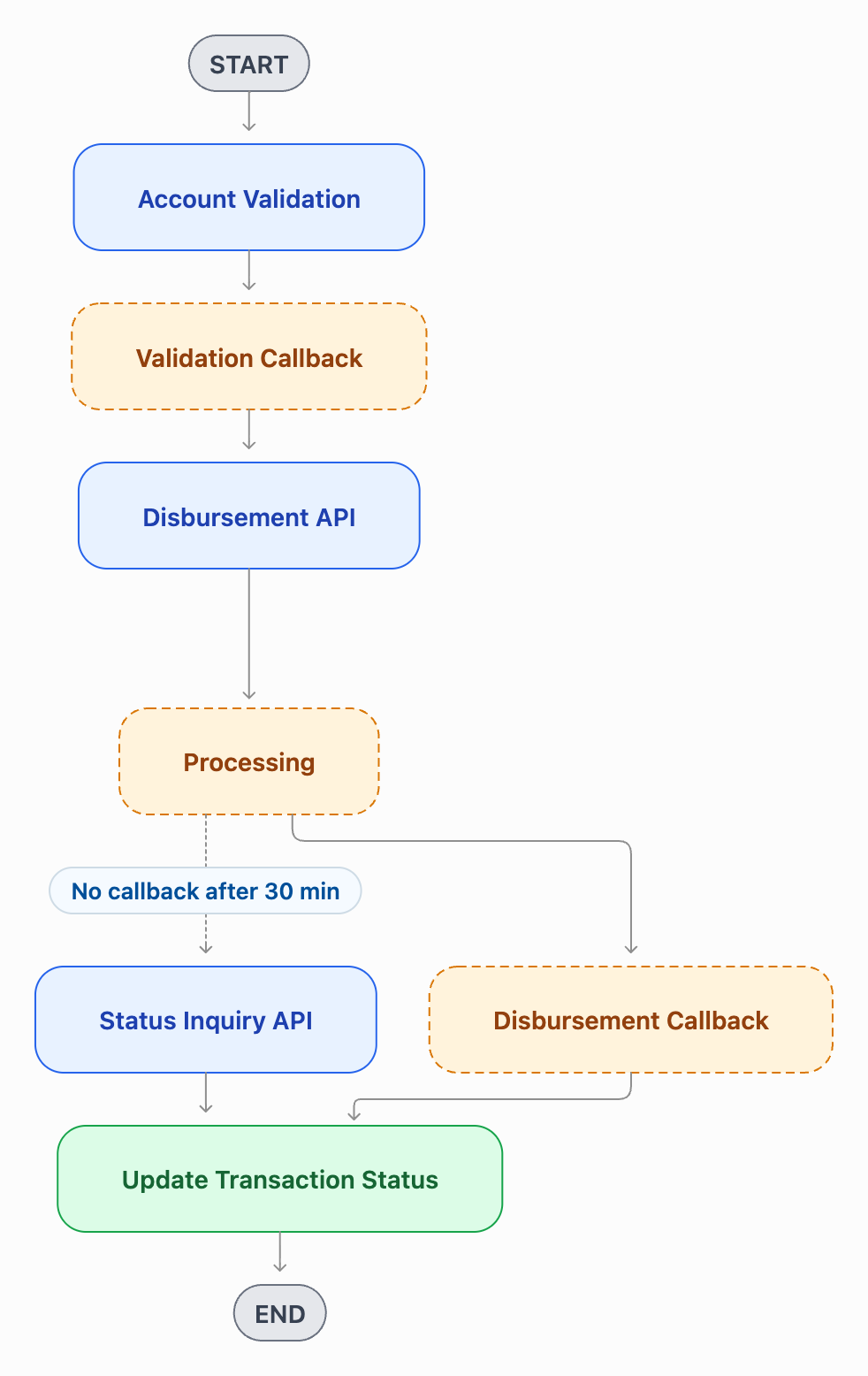
The following diagram illustrates the standard Instant Transfer process, from Account Validation to Disbursement status confirmation.
If the Disbursement callback is not received within 30 minutes, merchants must use the Status Inquiry API to verify the transaction status before taking further action.
Transaction Flows
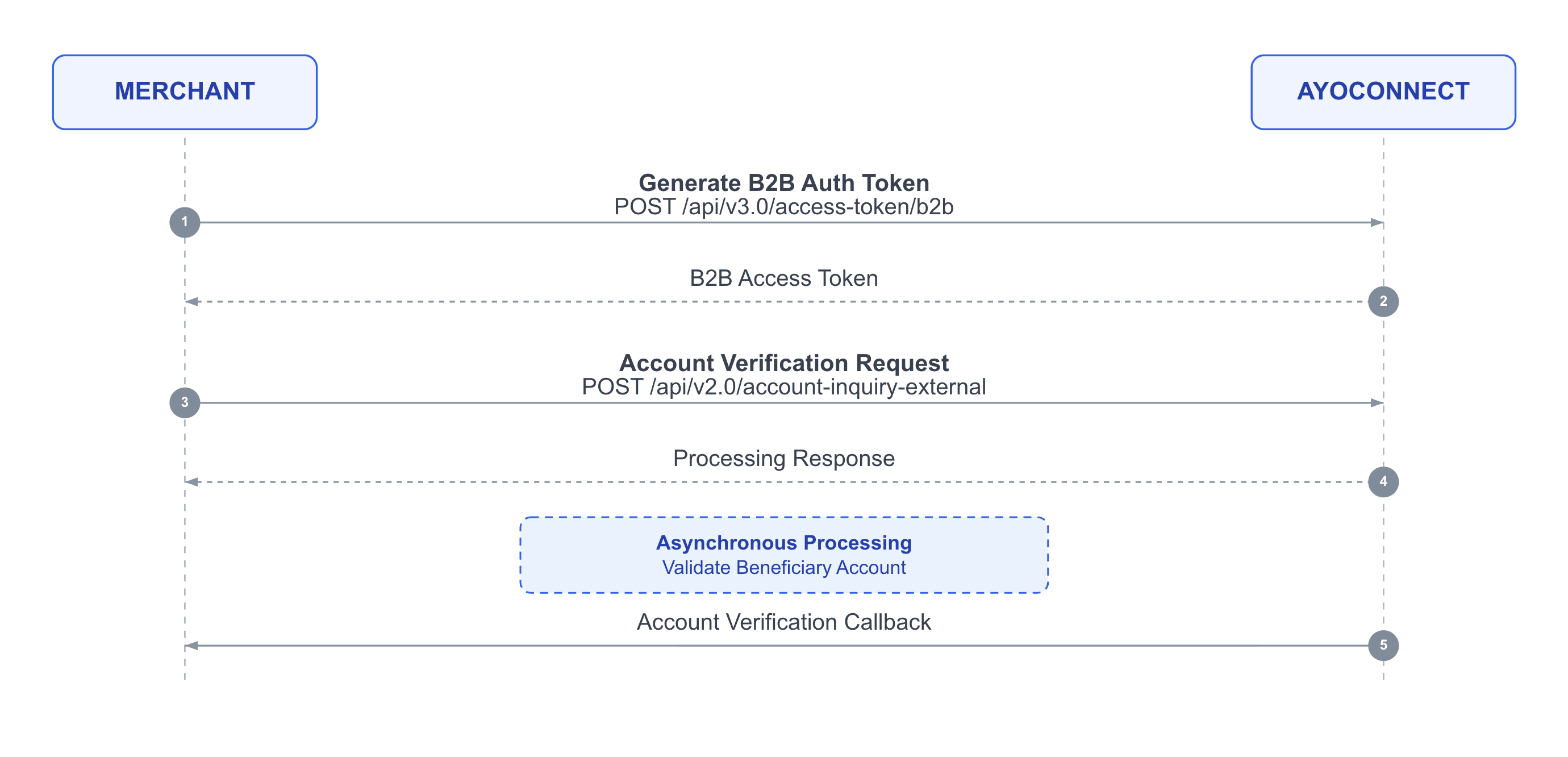
1. Account Validation
Account Validation must be completed successfully before initiating each Disbursement.
Once validation is successful, the callback provides additionalInfo.customerReference, which is required for the Disbursement request.
2. Disbursement
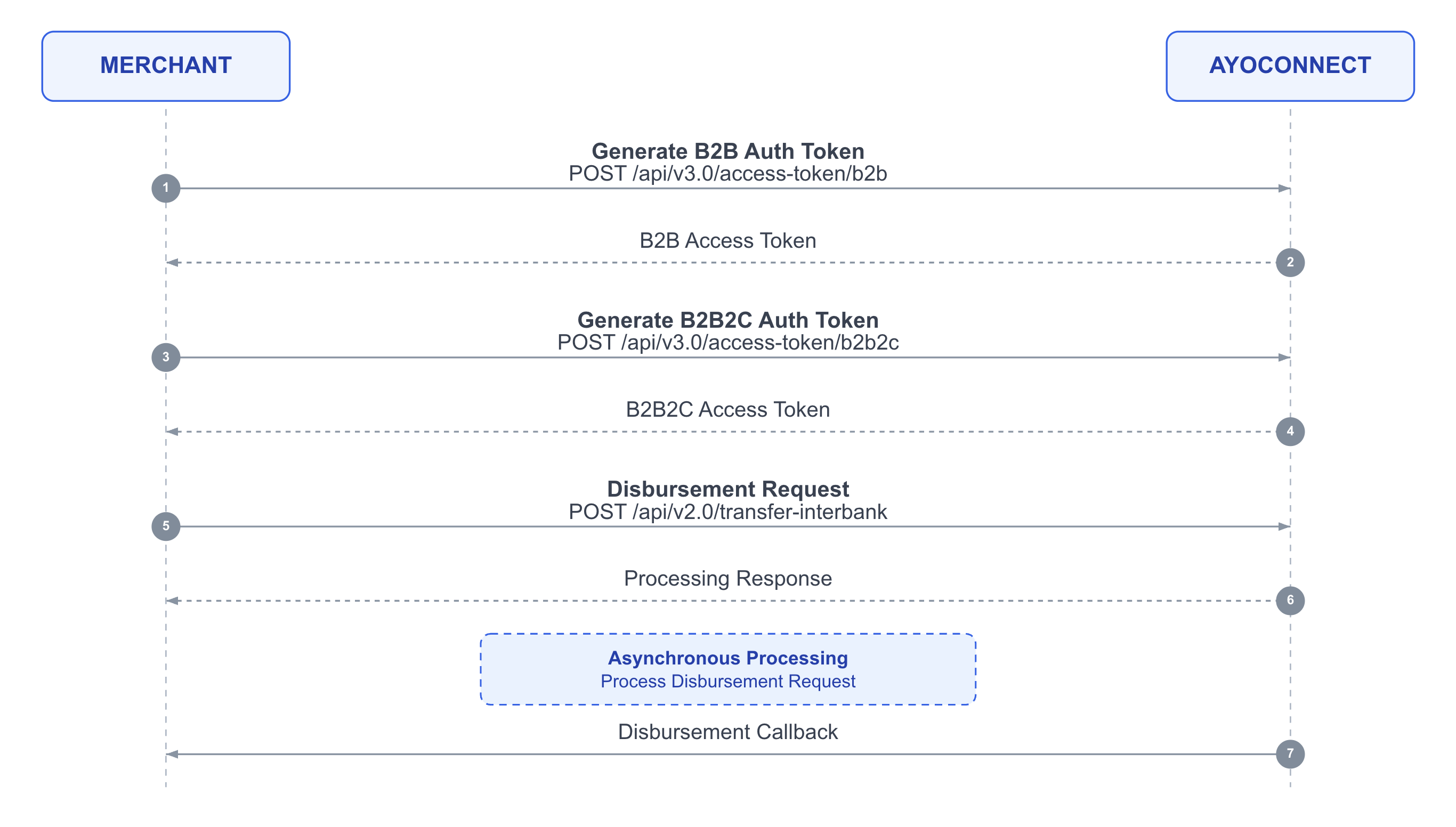
The Disbursement API initiates a transfer using the customerReference obtained from the successful Account Validation callback.
Disbursement transactions are processed asynchronously. An initial response of 2021800 confirms that the request has been accepted for processing, not that the funds have been transferred.
The final transaction outcome must be determined through the Disbursement Callback or Status Inquiry API.
3. Status Inquiry
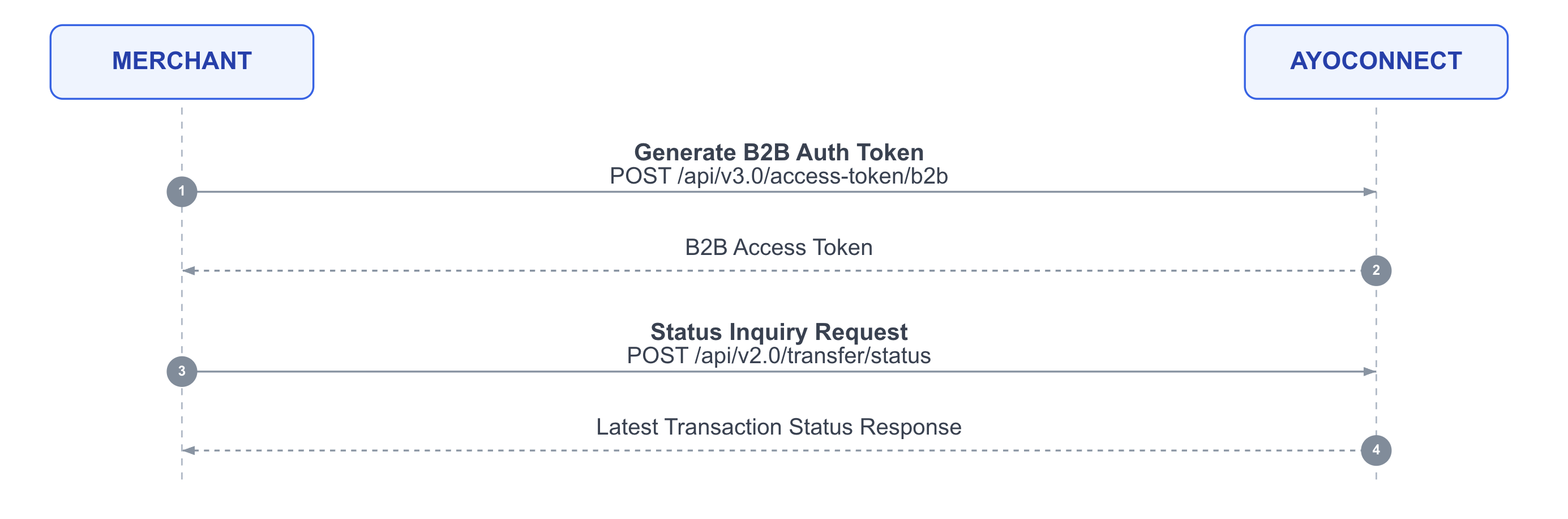
The Status Inquiry API retrieves the latest disbursement status when a callback is delayed, not received, or manual verification is required.
The API returns the transaction status synchronously and does not trigger another callback.
X-EXTERNAL-ID Requirement
The X-EXTERNAL-ID header is used to identify and track API requests within Ayoconnect.
- Each new Disbursement request must use a unique
X-EXTERNAL-ID. - Reusing an existing Disbursement
X-EXTERNAL-IDmay result in a conflict (409XX00). - A conflict response does not mean that the original transfer failed. Merchants must check the original transaction before taking further action.
- For Status Inquiry, set
originalExternalIdto the original Disbursement request'sX-EXTERNAL-ID.
Important: Do not generate a new X-EXTERNAL-ID to retry a Disbursement while the original transaction outcome remains unresolved. This may result in duplicate fund transfers.
Integration Guidelines
Account Validation Is Mandatory
Merchants must successfully complete Account Validation before initiating each Disbursement, even when transferring to a beneficiary who was previously validated.
The customerReference returned in the successful Account Validation callback must be included in the corresponding Disbursement request.
Asynchronous and Synchronous Processing
Account Validation and Disbursement are asynchronous APIs. The initial response acknowledges request processing, while the transaction result is provided through callbacks.
Status Inquiry and Balance Inquiry are synchronous APIs, meaning their results are returned directly in the API response.
Status Inquiry Is Optional During Normal Processing
Under normal conditions, merchants receive the Disbursement transaction result through a callback.
The Status Inquiry API should be used when:
- The callback is delayed or not received within 30 minutes.
- The transaction remains Pending and requires further verification.
- Manual transaction status verification is required.
Handling Pending Transactions and HTTP Errors
If the Disbursement API returns 03 – PENDING, HTTP 5xx, 5XX18XX, or a timeout, merchants MUST keep the transaction as Processing and MUST NOT initiate another Disbursement for the same payment.
Merchants must:
- Keep the transaction as Processing.
- Wait for the Disbursement Callback.
- If no callback is received within 30 minutes, use the Status Inquiry API to retrieve the latest transaction status.
- Continue monitoring if the transaction remains Pending or its outcome cannot be confirmed.
Important: The 30-minute waiting period is for status verification, not permission to retry.
Transaction Status Handling
Merchants must use latestTransactionStatus from the Disbursement Callback or Status Inquiry API to determine the transaction outcome.
| Status | Required Merchant Behavior |
|---|---|
| 00 - SUCCESS | Mark as Success. Do not retry. |
| 03 - PENDING | Keep as Processing. Do not retry. |
| 04 - REFUNDED | Mark as Refunded. Confirm the refund outcome before further action. |
| 06 - FAILED | Mark as Failed. Review the failure reason before retrying. |
| 07 - NOT FOUND | Verify the original transaction. Do not retry automatically. |
Handling Unknown or Abnormal Statuses
If a transaction returns an unexpected status or its final outcome cannot be determined, merchants must keep the transaction as Processing.
- Do not mark the transaction as Failed based solely on an HTTP error.
- Do not initiate another Disbursement while the original transaction remains unresolved.
- Continue checking the status through the callback or Status Inquiry API.
- Contact Ayoconnect Helpdesk if the transaction outcome cannot be confirmed.
For detailed requirements, refer to:
Updated 1 day ago